Slab inspection, Block BResolved
Construction and real estate
Hand site engineers the day's inspections with photos, and see every crew check in at the site.

TeamTrack is the work app for teams out in the field. Hand out jobs with photos, video or a voice note, follow every task from Pending to Resolved, and see who checked in, and from where.
On a site, in the office or at a client's door: if you hand out work and need to know it got done, TeamTrack fits the way your team already works.
Slab inspection, Block BResolved
Hand site engineers the day's inspections with photos, and see every crew check in at the site.
 Draft reply, Case 214In progress
Assign filings, client calls and court follow-ups, and see what is still pending before the hearing.
 Fix login bugResolved
Track bugs, client changes and on-site installs, with screenshots and voice notes on every task.
 Homepage bannersPending
Hand out briefs with references attached, and follow every deliverable through to approval.
 Panel check, 3rd floorIn progress
Send technicians to jobs, get photo proof back, and know who actually showed up.
TeamTrack replaces the WhatsApp group, the "is it done?" calls and the register book with one app built around the work itself.
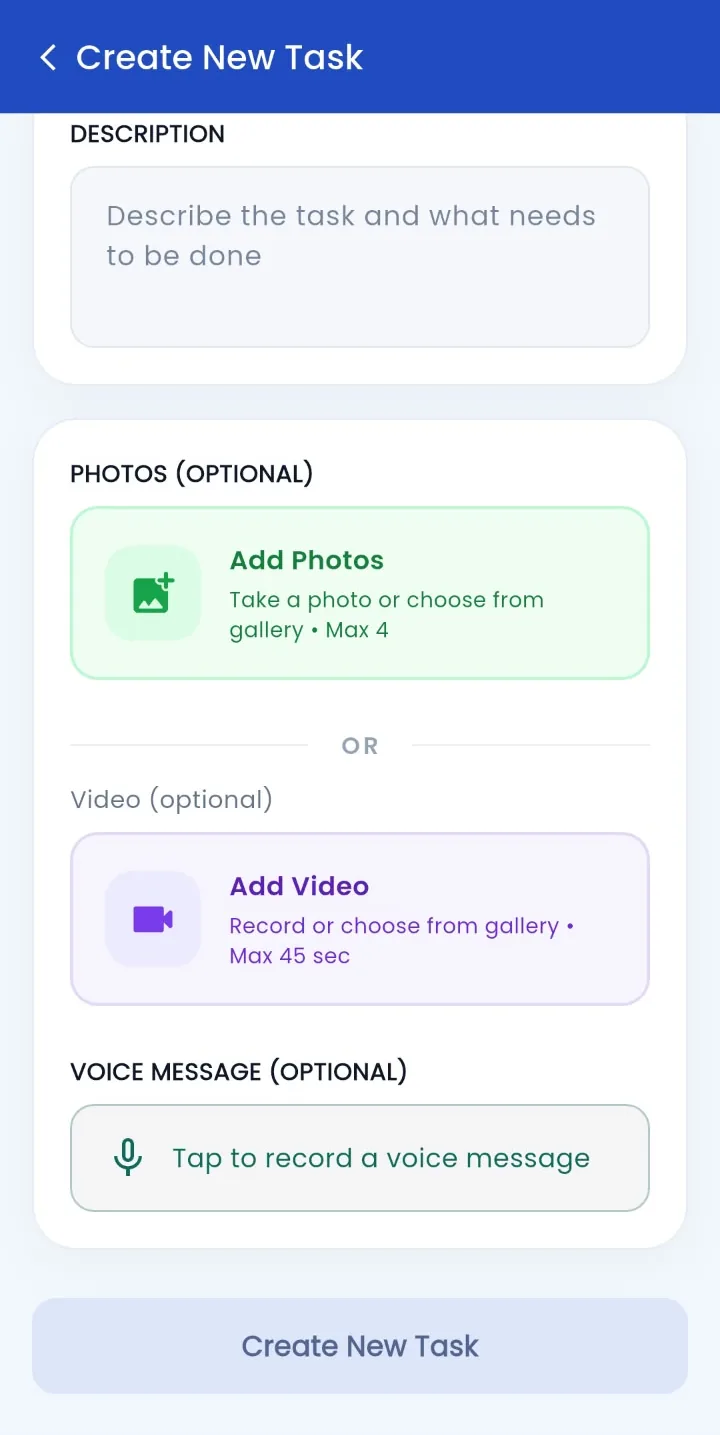
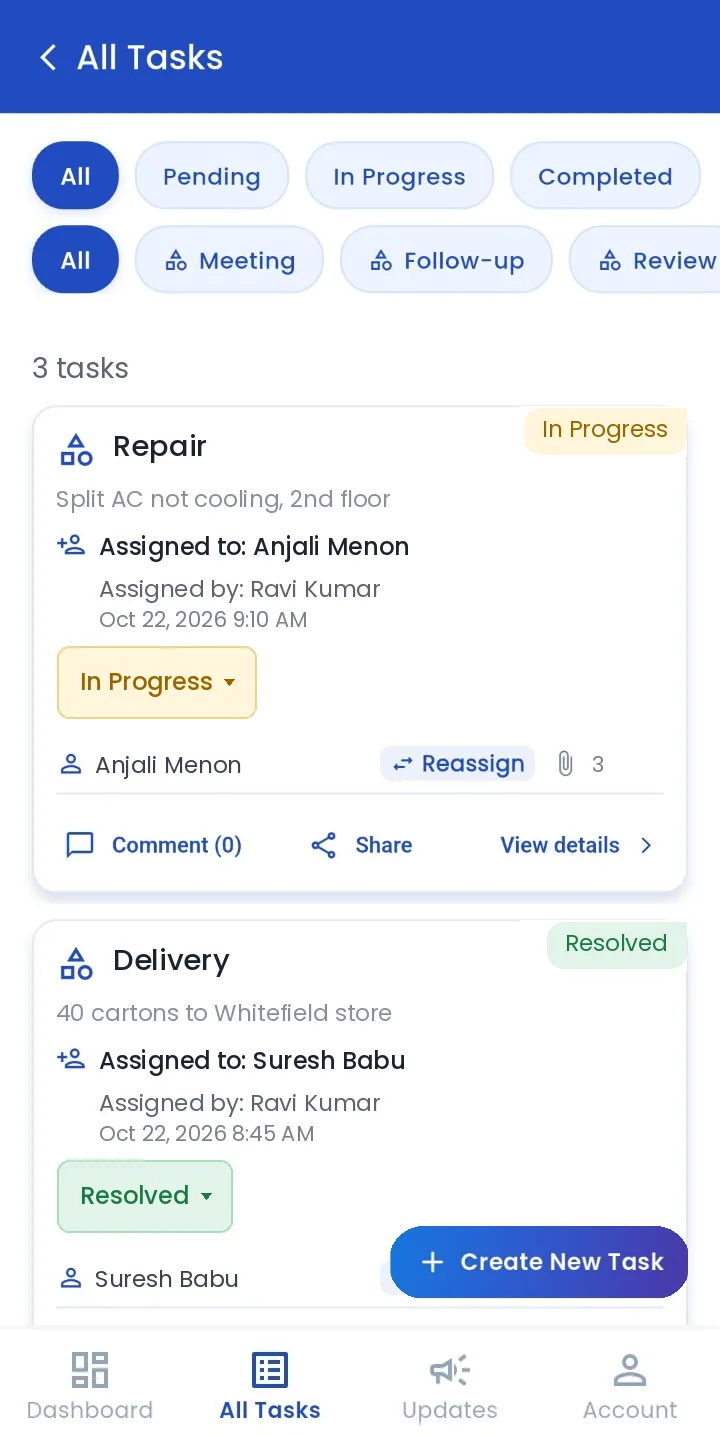
Create a task in seconds. Pick the person, describe the job and attach photos, a short video or a voice note so nothing gets lost in translation.
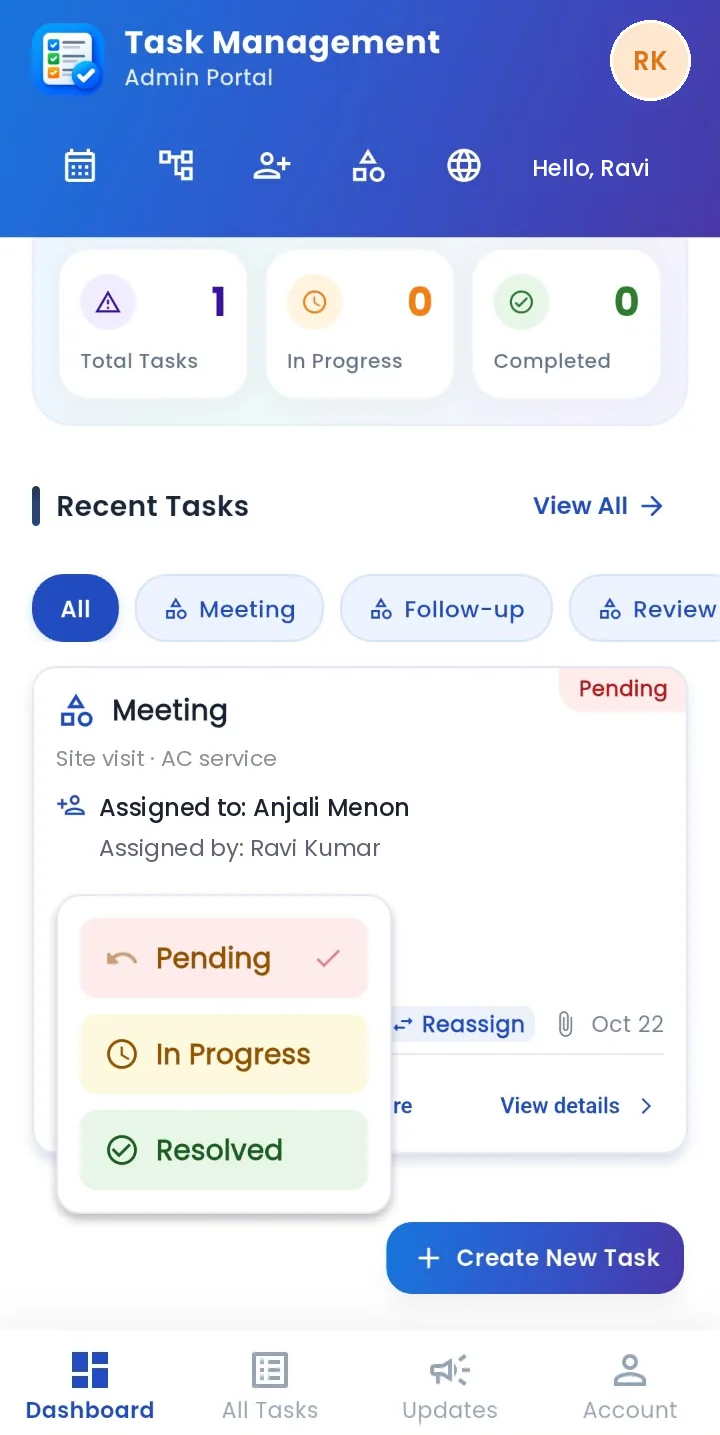
Each task moves from Pending to In progress to Resolved. See what's stuck, reassign in one tap and get proof back on the task.
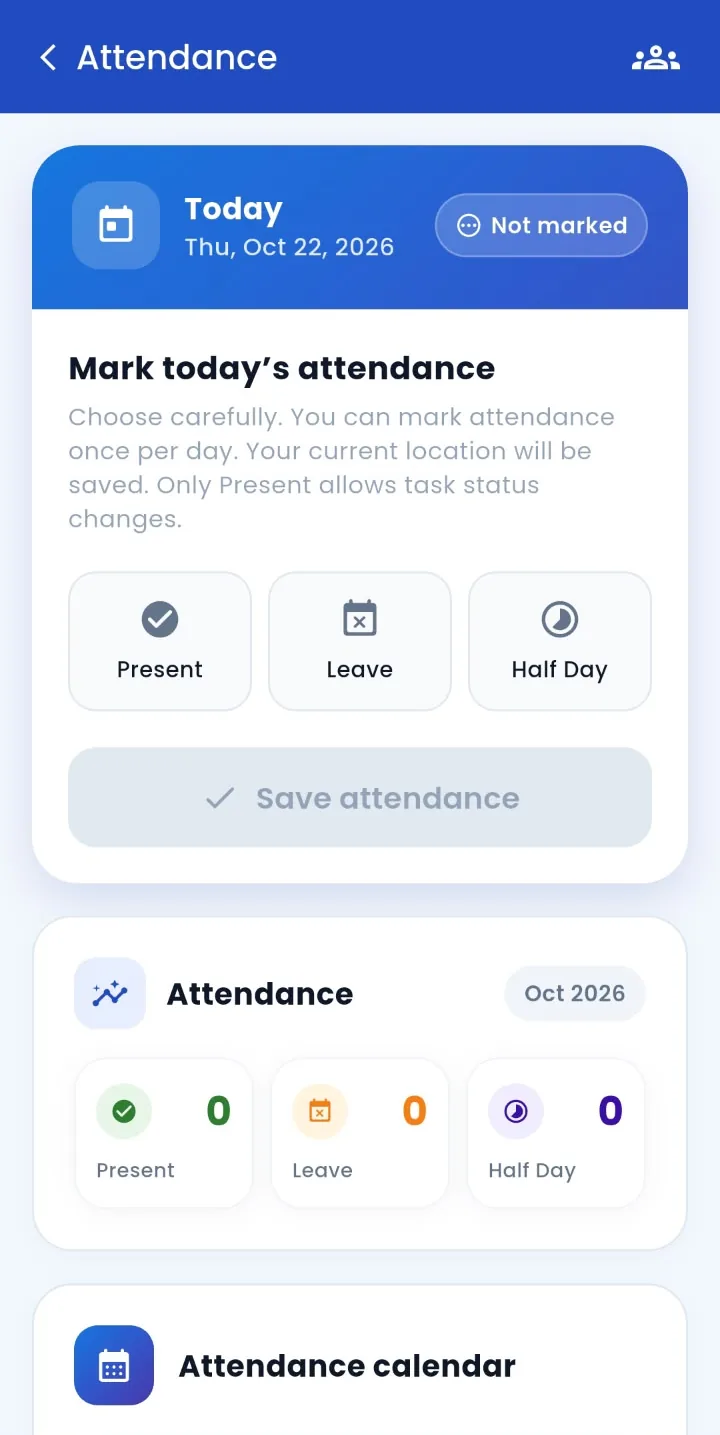
Your team marks Present, Leave or Half day once a day. Location is saved with it and the entry locks, so the record holds.
TeamTrack is a work management app for businesses with staff in the field, such as service, repair, delivery, cleaning and sales teams. Admins and supervisors assign tasks with photos, video and voice notes and track each one from Pending to Resolved. Team members mark attendance once a day with their location, so you know who showed up. TeamTrack can also work out monthly pay from daily rates. It runs on iPhone and Android.
The work comes first. Here's how a normal day runs once your team is on the app.
Pick a task type, choose a user or supervisor, describe the job and attach what they need to see: up to 4 photos, a 45-second video, or a voice message when talking is quicker than typing.
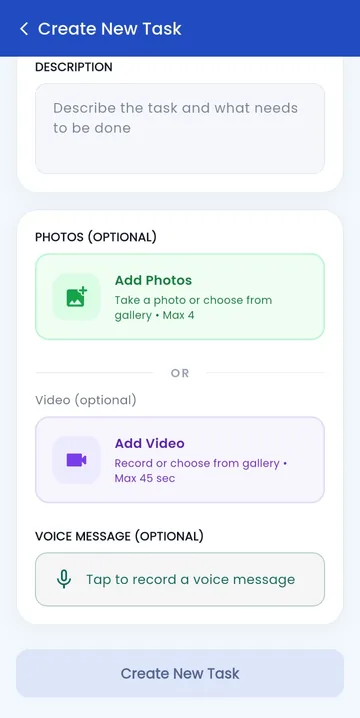
Each person taps Present, Leave or Half day once. Their location is saved with it, and the entry locks. Only people marked Present can move tasks forward, so work and attendance always match.
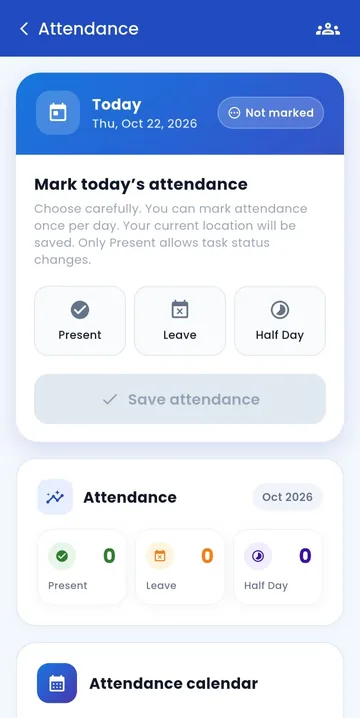
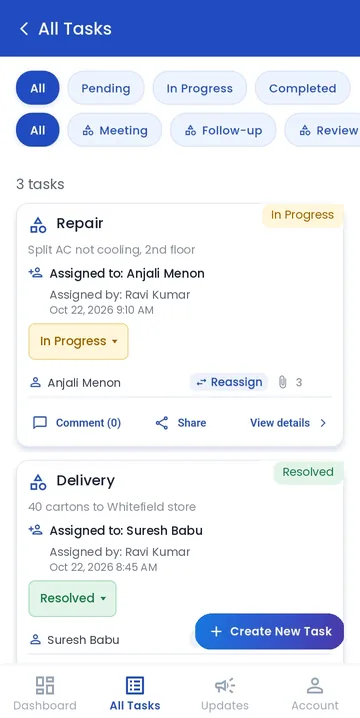
Tasks go from Pending to In progress to Resolved. Reassign in one tap when someone is stuck, comment on the task, or share it to WhatsApp and call the person from the task itself.
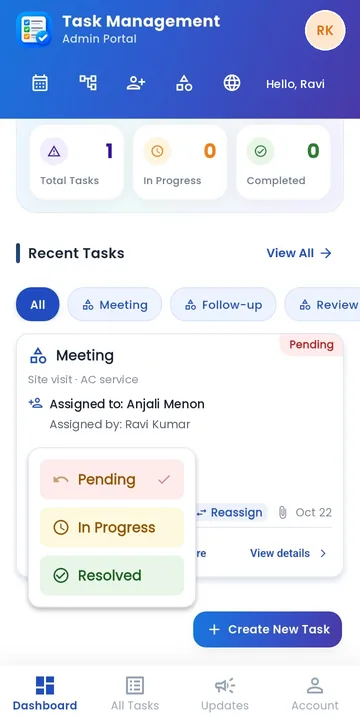
Finished jobs are marked Resolved, with photos, video and voice notes kept on the task. Filter All Tasks by status or task type to review the whole day in a minute.
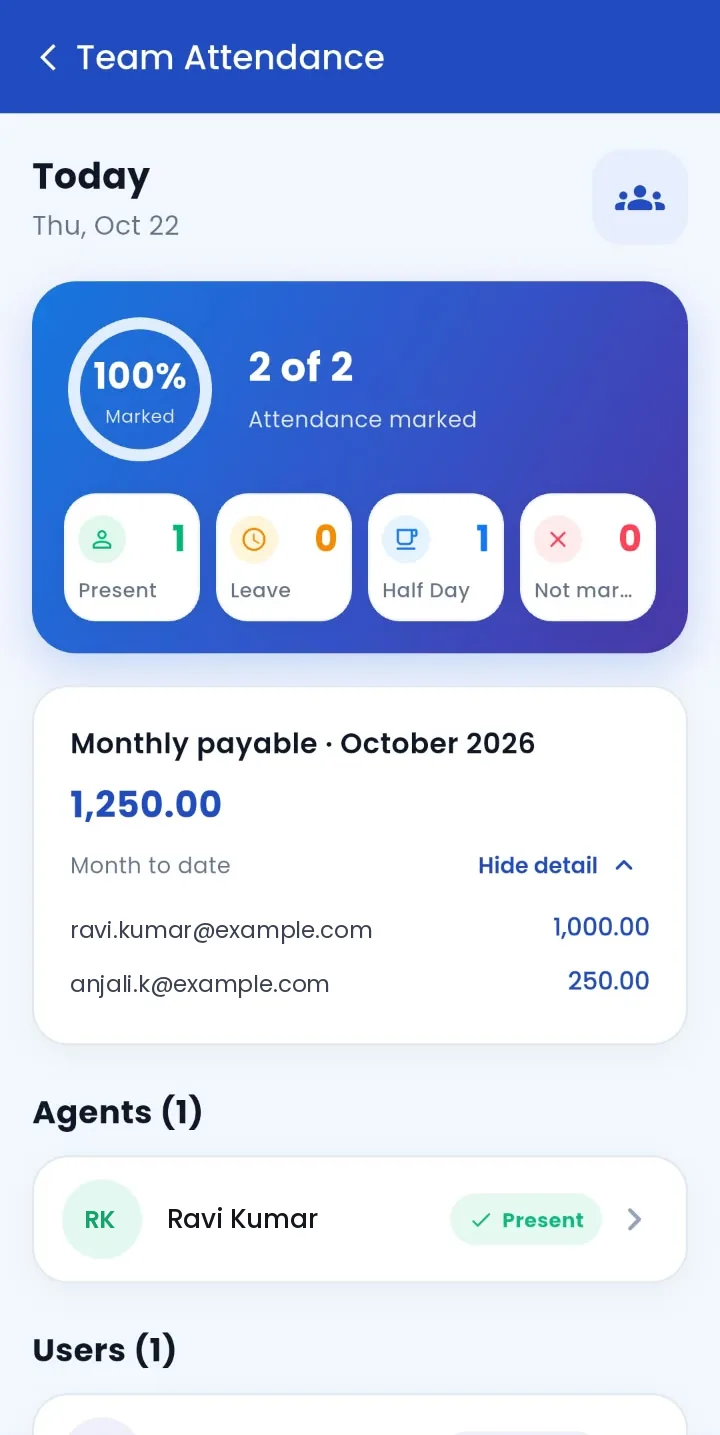
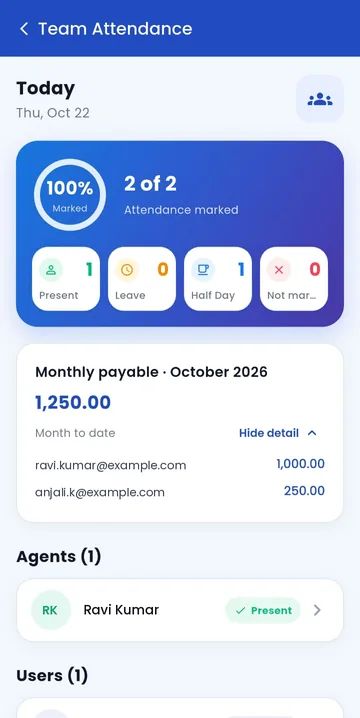
Paying by the day? Set a full-day and half-day rate per person and TeamTrack shows the month-to-date payable for the team and for each person.
Three roles keep owners, team leads and staff out of each other's way.
Runs the workspace
The owner or office manager. Sees every task and the whole team's attendance.
Leads a team on the ground
Coordinates the people who report to them and keeps an eye on task progress.
Does the work
Marks attendance, picks up tasks and updates progress from the field.
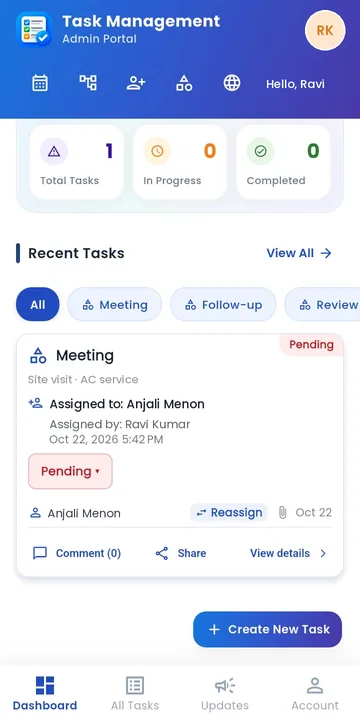
Open TeamTrack and see total tasks, what's in progress and what's completed. Recent tasks sit right below, filtered by type, with one tap to create the next one.
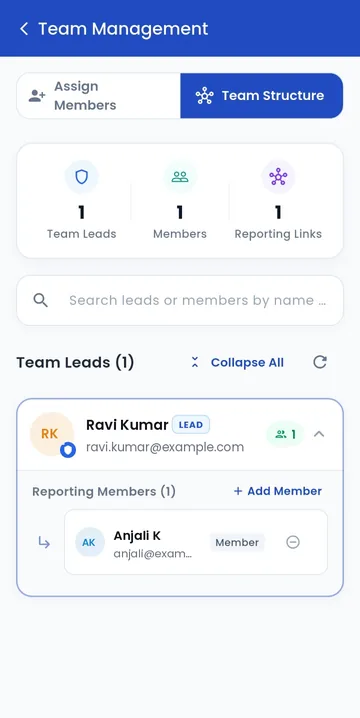
Pick a team lead, tick the members who report to them, and set their daily rates in the same step. Team Structure shows every lead, their people and the reporting links at a glance.
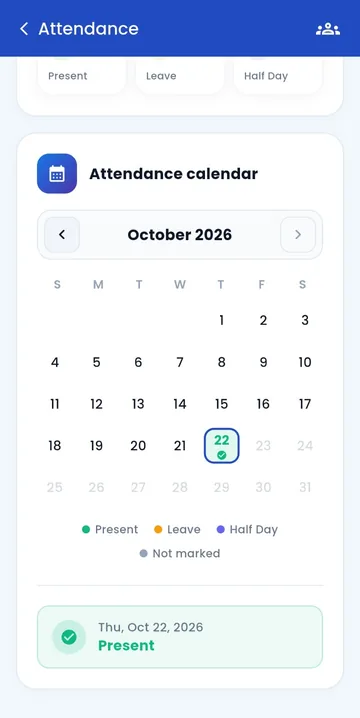
Every person gets a calendar coloured by status, with monthly totals for Present, Leave and Half day. Team Attendance shows today's count and who hasn't marked yet.
Post official updates and announcements everyone sees in one place, instead of in a chat that scrolls away.
Questions and answers stay with the job they're about.
Share a task to WhatsApp or call the assignee straight from the task.
Start with Meeting, Follow-up, Review, Documentation, Delivery, Repair and Cleaning, then add yours.
No new password to remember. Each business gets its own workspace and Account ID.
Move a task to another user or supervisor when plans change.
The whole app works in English, Hindi and Malayalam. Give each task type a translated name and everyone sees work in the language they chose.
Finished work comes back with evidence, and every check-in comes with a location. Both hold up when it matters.
Photos, video and voice notes live on the task, so finished work comes with evidence.
Each person marks attendance once a day. After saving, the entry can't be changed.
The person's current location is saved when they mark attendance, so you know where the day started.
Admins, supervisors and users each see what their role needs. Profile details are managed by the admin.
Every business has a separate workspace with its own Account ID. Invitations are stored securely inside it.
Plans are paid through Razorpay with 256-bit SSL. Use UPI apps like PhonePe or any method Razorpay supports.
Start free. Upgrade inside the app when you need more people. All prices in Indian rupees.
₹0
Free forever
₹849 /month
or ₹8,490 a year
₹2,099 /month
For larger crews
Custom
Built around your team
Most small teams start with paper and chat. Here's what changes.
| Job | Register and WhatsApp | TeamTrack |
|---|---|---|
| Assigning work | Messages lost in a busy group chat | One task per job, with type, person, photos, video and voice note |
| Progress | Calling around to ask "done?" | Pending, In progress and Resolved, filtered on one screen |
| Proof of work | A thumbs-up emoji | Photos, video and voice notes kept on the task |
| Showing up | Written in a register, easy to fill in later | Marked on the phone, saved with location, locked |
| Month-end pay | Counting days and half days by hand | Month-to-date payable from full-day and half-day rates |
| Language | Whatever the sender typed | English, Hindi or Malayalam per person |
Install TeamTrack, choose an Account ID for your business and pick your country.
Sign up with Google or enter your details. You're the workspace admin.
Add names and emails, choose User or Supervisor, then email or share the invite.
Pick team leads, add who reports to them and set daily rates if you pay by the day.
Something else on your mind? Email sales@myteamtrack.com.
TeamTrack is a mobile app for assigning work to field and service teams and tracking it to done. Managers hand out tasks with photos, video and voice notes and follow each one from Pending to Resolved. Team members also mark attendance once a day with their location, so you know who showed up.
Tap Create New Task, pick a task type, choose the user or supervisor, add a description and attach up to 4 photos, a 45-second video or a voice message. The task appears as Pending, moves to In progress and then Resolved. Filter All Tasks by status or type, reassign with one tap, comment, or share it to WhatsApp.
Any business that hands out work and needs to know it got done: construction and real estate teams, law firms and offices, software and IT teams, agencies and studios, and field service and maintenance crews. Teams of up to 7 people can use it free.
Yes. Get it for iPhone on the App Store and for Android on Google Play. Your workspace, team and data are the same on both.
Yes. The Free plan is free forever for up to 7 team members (5 users, 1 supervisor and 1 admin) with 5 concurrent calls and 250 MB of cloud storage.
There are four plans: Free (₹0, up to 7 members), Starter (₹849 a month or ₹8,490 a year, up to 27 members), Growth (₹2,099 a month, up to 65 members) and Enterprise (custom pricing).
Each person marks today's attendance once as Present, Leave or Half day. Their current location is saved with it and the entry can't be changed afterwards. Only people marked Present can change task status. Admins see the whole team's attendance and a calendar for each person.
Yes. When you assign a member to a team lead you can set an optional full-day and half-day rate. TeamTrack then shows the month-to-date payable for the team and for each person, based on their attendance.
Admins manage users, teams, task types and settings. Supervisors coordinate their team and monitor task progress. Users create tasks and track their own progress.
Up to 4 photos from the camera or gallery, a video of up to 45 seconds, and a recorded voice message, along with a written description.
English, Hindi and Malayalam. Task types can also have Hindi and Malayalam names, and English is used when a translation isn't available.
Open Invite People, enter the person's name and email, choose User or Supervisor and create the invitation. Email it or share it on any app. They install TeamTrack, enter your Account ID and sign in with the invited email.
You upgrade inside the app. Payments go through Razorpay checkout secured with 256-bit SSL, and you can pay with UPI apps such as PhonePe or other methods Razorpay offers.

Free for your first 7 people. Setup takes about ten minutes.